Forum Replies Created
- AuthorPosts
 Marko VasiljevicKeymaster
Hello Tim,
Thank you for the information and I am glad that you found the source of the issue.
You should keep it disabled in this case because it’s not recommended to use more than one optimization plugin.
Jetpack offers some minimal and basic optimization and since you are using W3 Total Cache you should keep this disabled.
Thanks!Marko VasiljevicKeymasterHello Tim,
Thank you for reaching out and I am happy to assist you with this.
I’ve checked your website and browsed through your website and I can see all the images loading correctly – no broken links.
Since this only happens on your computer it’s unlikely that it has something to do with the W3 Total Cache. Have you tried clearing your browser cache or check the website in some other browser and see if you are experiencing the same issue?
Let me know if this helps!
Thanks!Marko VasiljevicKeymasterHello Pablo,
Thank you for reaching out and thank you for using W3 Total Cache!
I’ve replied to the topic you created in wp.org so please continue the correspondence there so we can avoid duplicating the answers.
Thanks!- This reply was modified 4 years, 7 months ago by
 Marko Vasiljevic.
 - This reply was modified 4 years, 7 months ago by Marko Vasiljevic.
Marko VasiljevicKeymasterHello angel,
Thank you for reaching out and thank you for using W3 Total Cache.
I’ve tested your website and as I can see, the one thing that impacts your website scores the most is your images. Google is suggesting optimizing images and serve them in the next-gen (webp) format.
Since this is currently out of W3TC scope, I would suggest using some image optimization plugins like Ewww image optimization or SmushIt and use one of the mentioned plugins to optimize your images.
I hope this helps!
Thank you!Marko VasiljevicKeymasterHello Rafael,
Thank you for yoru question and I am happy to assist you with this.
W3 Total Cache does not have an option to schedule cache purging. You can, however, set up a custom cron on your host, and callw3tc_flush_all();every two weeks.
I hope this helps!
Thanks!Marko VasiljevicKeymasterHello Mario,
I am sorry about the issue you are experiencing with installing W3 Total Cache and I am happy to assist you with this.
Server Error 500 Internal Server Error The server encountered an internal error or misconfiguration and was unable to complete your request. Please contact the server administrator to inform of the time the error occurred and of anything you might have done that may have caused the error. More information about this error may be available in the server error log.
Have you tried reaching out to yoru hosting provider and check the error log to see what may be causing the issue as suggested in the “Installation failed error”?
You can try to manually install the plugin:
1. Download the plugin here. It will create a Zip file/archive to send to your computer.
2. Log into your WordPress admin site and go to the Plugins section.
3.Click on Upload and select the zip file. WordPress will unpack everything and put files in the right place.
4.Activate the plugin.You can also try unzipping the file and manually upload the folder to /wp-content/plugins/ and then go pack to your wp-admin area, go to installed plugins and activate the plugin there.
I hope it helps!
Thanks!
Marko VasiljevicKeymasterHello Thomas,
Thank you fr reaching out and I am happy to assist you with this.
To exclude pages from being cached, add the page to Performance>Page Cache>Advanced>”Never Cache following Pages” field, for example:/cart/ /checkout/To exclude specific JS or CSS from being minified, go to Performance>Minify>Advanced>Never Minify following CSS files (or Never Minify following js files ) and add the path of the file, for example:
/wp-content/plugins/klarna-checkout-for-woocommerce/assets/js/klarna-checkout-for-woocommerce.min.js
Please note that you should exclude files from being minified only if Minify option is enabled in Perfomrance>General settings.Thanks!
Marko VasiljevicKeymasterHello KT,
Thank you for your question.
The Garbage collection interval is there to delete any _old files that are being created after the cache is purged.
So once the cache is purged if the Garbage collection interval is set to 3600s, all _old files will be deleted from the server after one hour.
Thanks!Marko VasiljevicKeymasterHello Ken,
Thank you for reaching out.
Please contact us via email and provide the transaction details so I can check your subscription. As this is a public forum, you should avoid posting any private information.
Thanks!Marko VasiljevicKeymasterHello Warren,
Thank you for your question and I am happy to assist you with this.
I am sure you understand that we cannot test W3 Total Cache with all plugins out there so I cannot give you a straightforward answer.
I’ve never heard about the plugin you are mentioning before. Can you please confirm this is the plugin you are referring to:
In order to find out which W3TC setting might be causing this, please disable the settings one by one in Performance>general settings, save the settings and purge the cache after each setting is disabled and see which one might be causing the issue.
Thank you!Marko VasiljevicKeymasterHello KT,
Thank you for reaching out and I am happy to help!
W3 Total Cache does not auto-purge cache unless the post/article is published/updated or any other change on the website that triggers the Perofmrnace>Page Cache>Purge Policy settings. In other words, if the cache is not purged, the cache will remain the same.
You can entirely disable those options in Perofmrnace>Page Cache>Purge Policy settings if you want to purge the cache manually or you do not wish to purge the cache at all.Thanks!
Marko VasiljevicKeymasterHello Mert,
Thank you for reaching out and for using W3 Total Cache!
It would be great if you could share your website URL and your test results so I can check this.
As I understand the problem is in your wp-admin area where you are experiencing a long waiting time?
Thanks!Marko VasiljevicKeymasterHello Joseph,
Thank you for reaching out and thank you for using W3 Total Cache.
Yes, the license is renewed every year so the price is per year.
W3 Total Cache Pro licenses are valid on a per-install basis, meaning you need one for every WordPress instance you run. If you have three separate websites, you will need three licenses in total—one for each site. If you have five sites in a WordPress multisite instance, you need just one license for all five sites. If you are interested in bulk licensing, please email us for more information.Thank you!
Marko VasiljevicKeymasterHello Jose,
Thank you for reaching out and I am sorry you are experiencing the issues installing W3 Total Cache.
The issue is most likely related to your server files/folder permissions or dis quota.
Login to cPanel or your web hosting dashboard and check the disk quota and make sure you have the correct write permissions set on your server (files 644 and folders 755)
Alternatively, you can try to manually install the plugin:
1. Download the plugin here. It will create a Zip file/archive to send to your computer.
2. Log into your WordPress admin site and go to the Plugins section.
3.Click on Upload and select the zip file. WordPress will unpack everything and put files in the right place.
4.Activate the plugin.You can also try unzipping the file and manually upload the folder to /wp-content/plugins/ and then go pack to your wp-admin area, go to installed plugins and activate the plugin there.
I hope it helps!
Thanks!
Marko VasiljevicKeymasterHello Shane,
Thank you for reaching out, and thanks for your interest in W3 Total Cache Pro!
We don’t offer “free trials” at the moment, we do have a 30-day money-back guarantee. If you do decide to proceed, you’ll have access to all of the premium features. Feel free to reach out the support via the plugin in Performance>Support for any assistance.
Thanks!
June 30, 2021 at 12:57 pm in reply to: Multisite- can network admin set options for all sites? #39998Marko VasiljevicKeymasterHello Lisa,
This is how W3TC works.
It appears that only the Super Admin is able to access it in your case.
Thanks!June 30, 2021 at 9:05 am in reply to: Multisite- can network admin set options for all sites? #39991Marko VasiljevicKeymasterHello Lisa,
This is related to the user privileges. So you need to change the privileges to be able to see the W3TC General Settings page.
June 29, 2021 at 12:58 pm in reply to: Multisite- can network admin set options for all sites? #39949Marko VasiljevicKeymasterHello Lisa,
It would be great if you could share some screenshots of what you are seeing on the W3TC settings page on one of the subsites.
This is how it supposed to look like for example (Please note that in this case the option Use single network configuration is enabled and you can see the “Use specific settings” button )June 29, 2021 at 11:28 am in reply to: Multisite- can network admin set options for all sites? #39944Marko VasiljevicKeymasterHello Lisa,
Thank you for your feedback.
Yes, the Use single network configuration option is enabled by default on the network activation of W3TC. This means that the configuration used on the main website will also be applied to all subsites.
Disabling this setting allows you to use a different configuration for each subsite.
As Jesse mentioned, in the multisite setup, the only way to activate W3TC is network activation.
So you cannot install the W3TC on a single subsite.
The individual options you are seeing on each website should be greyed out if the option Use single network configuration is enabled.
I hope this clarifies this and let me know if you have any other questions or if I misunderstood your inquiry.
Thanks!Marko VasiljevicKeymasterHello Martin,
I’ve already answered both of your emails and explained the situation and the steps you need to take.
Please reply to the email if you have any additional questions, so we can avoid duplicating the answers.
Thanks!June 24, 2021 at 6:02 am in reply to: W3 Total Cache Causing PayPal Shopping Cart to Not Work #39744Marko VasiljevicKeymasterHello Larry,
You are most welcome.
Glad to know the issue is resolved.
Thanks!Marko VasiljevicKeymasterHello Thomas,
Thank you for reaching out and thank you for your questions.
DB cluster is for Pro users only and it is supported by W3 Total Cache.
Let me make some tests and I’ll get back to you on this as soon as I have more details to share.
Thanks!Marko VasiljevicKeymasterHello Berel,
Thank you for reaching out.
The plugin detects IIS installation and writes the rules in the ISS config. There were no reported issues so far with the ISS 10 version.
Thanks!June 23, 2021 at 10:57 am in reply to: W3 Total Cache Causing PayPal Shopping Cart to Not Work #39685Marko VasiljevicKeymasterHello Larry,
I am sorry about the issue you are having and I am happy to assist you with this.
Can you please add /shopping-cart/ to Perfomrance>Page Cache>Advanced>”Never Cache following Pages” field and also, add the same page to Perfomrance>Minify>Advanced>”Never Minify following Pages”, save all settings, and purge the cache and see if the issue persists?
Thanks!Marko VasiljevicKeymasterHello Remco,
Thank you for choosing the best caching plugin, W3 Total Cache.
W3 Total Cache Pro licenses are valid on a per-install basis, meaning you need one for every WordPress instance you run. If you have three separate websites, you will need three licenses in total—one for each site. If you have five sites in a WordPress multisite instance, you need just one license for all five sites.
We do not currently offer any licenses for developers, however, if you are interested in bulk licensing, please email us for more information, and let me know the details so we can offer you the best deal.
Thanks!June 17, 2021 at 8:11 am in reply to: Where is my subscription in boldgrid.com and Cloudflare error in W3TC #39394Marko VasiljevicKeymasterHello Stefano,
Thank you for the information.
What you are seeing is the widget in the Dashboard page which apparently is not working as expected at the moment.
However, this does not mean that Cloudflare is not working, it’s just an issue with the widget.
Thank you for bringing this to our attention and we’ll make sure to fix this in future releases.
Thanks!Marko VasiljevicKeymasterHello Carlos,
Thank you for the information and I am glad the issue is resolved.
You can check our Pro support offer and pricing via the plugin in Performance>Support.
Thanks!Marko VasiljevicKeymasterHello Markus,
Thank you for reaching out.
I’ve checked your website and I do not see that Minify is enabled. I can see that Page Cache, BRowser Cache, Lazy Loading, and Object caching are enabled, but not Minify.
Please make sure to enable Minify in Performance>General settings, save all settings and purge the cache.Thanks!
June 14, 2021 at 11:44 am in reply to: Where is my subscription in boldgrid.com and Cloudflare error in W3TC #39232Marko VasiljevicKeymasterHello Stefano,
Thank you for your question.
Let me check that widget and I’ll get back to you.
Thanks!Marko VasiljevicKeymasterHello Carlos,
Thank you for reaching out.
First of all, this is a public forum so please do not share private information such as your license key.
Can you please disable the settings one by one in Performance>general settings, save the settings and purge the cache after each setting is disabled, and see which one might be causing the issue?Thanks!
June 10, 2021 at 12:41 pm in reply to: Where is my subscription in boldgrid.com and Cloudflare error in W3TC #39094Marko VasiljevicKeymasterHello,
Yes, you are correct, the Cloudflare is connected.
You are most welcome!
Thanks!Marko VasiljevicKeymasterHello Chris,
Most likely some plugin or theme was updated so all you need to do in this case is to purge the cache.
Thanks!June 7, 2021 at 9:42 am in reply to: Where is my subscription in boldgrid.com and Cloudflare error in W3TC #38927Marko VasiljevicKeymasterHello Stefano,
Thank you for reaching out.
The link you provided is the billing account. The W3 Total Cache Pro license key should have been sent to the email address used to subscribe to W3 Total Cache Pro.
W3 Total Cache is a separate plugin so you can drop us a note directly via the plugin in Performance>Support>Billing.
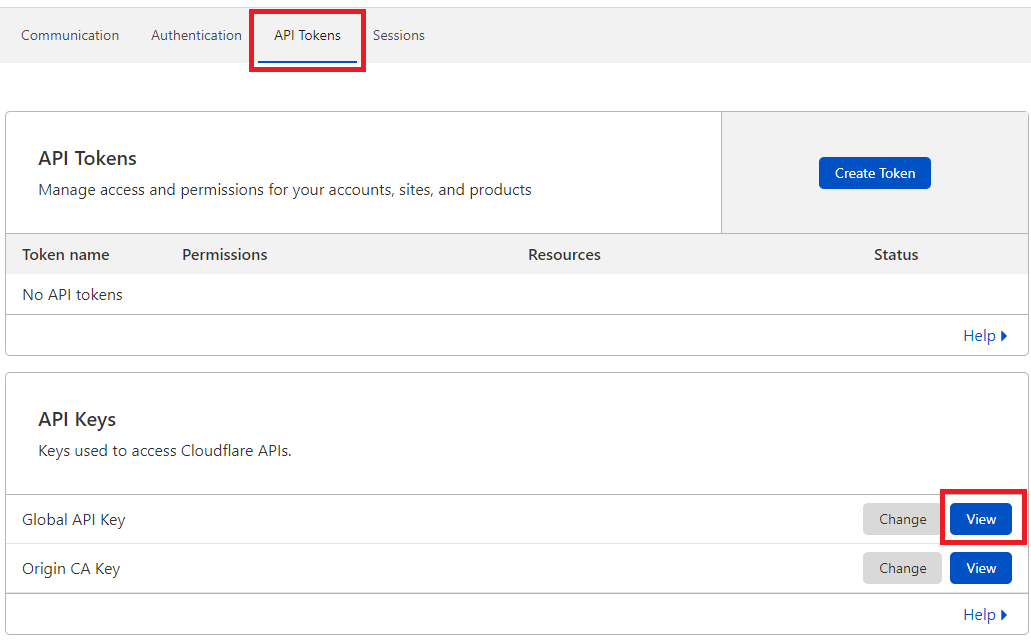
As for the Cloudflare question, you need to use the Global API key. Go to your Cloudflare dashboard>Get your API token, select API Tokens in the top menu, and under API Keys click “view” in Global API Key section:

As for the Backup plugin, this is only a notification that you are not using the recommended Blodgrid Total Upkeep plugin which we recommend.
Thanks!Marko VasiljevicKeymasterHello Chris,
Thank you for reaching out and I am sorry about the issue you are experiencing.
Can you please specify when you started to experience the issue?
As I can see W3 Total Cache is currently disabled? Can you please re-enabled W3TC and disable the settings one by one in Performance>general settings, save the settings and purge the cache after each setting is disabled, and see which one might be causing the issue?Thanks!
Marko VasiljevicKeymasterHello Eric,
Well, this is really strange.
So the cache control applies to the files but not to the HTML/XMl?
Can you please share more information about your environment?
Thanks!Marko VasiljevicKeymasterHello kamran
Nothing in the settings suggests those issues and I am not seeing any issues on your website at the moment.
Can you please confirm that you are still experiencing those issues?
Thanks!Marko VasiljevicKeymasterHello Diego,
Thank you for reaching out.
I’ve checked your website and I am seeing absolutely no warnings or errors in the console.
Can you please share the screenshot of what you are seeing?
Thanks!Marko VasiljevicKeymasterHello Eric,
Thank you for reaching out.
It would be great if you could share the website URL so I can check this.
Also, can you please define the Dynamic Content?
Do you have any other BC rules defined in the nginx.conf or on the server besides W3TC rules?
Thanks!Marko VasiljevicKeymasterHello Kamran,
Thank you for reaching out.
Can you please share more specific information on how the website is behaving and what tool you used to test the performance of your website?
Thanks!Marko VasiljevicKeymasterHello Simone,
Thank you for your inquiry and for being interested in W3 Total Cache for your company.
Since this is a public forum, please drop us a note with all information needed via the plugin itself in Performance>Support, or via the website.
I’ll get back to you as soon as I have an answer for you.
Thanks!- This reply was modified 4 years, 7 months ago by
- AuthorPosts